Swiss QR-bill
Swiss invoices usually include a payment slip. In mid-2020, Switzerland introduced the QR-bill, successively replacing the traditional payment slips. The QR-bill includes a QR code that holds the payment-relevant information. All market participants must technically be able to issue and process QR-bills.
In this respect, JustOn Billing & Invoice Management supports generating invoices that include the Swiss QR code. It prints the QR-bill payment slip on a new page at the end of the invoice PDF.
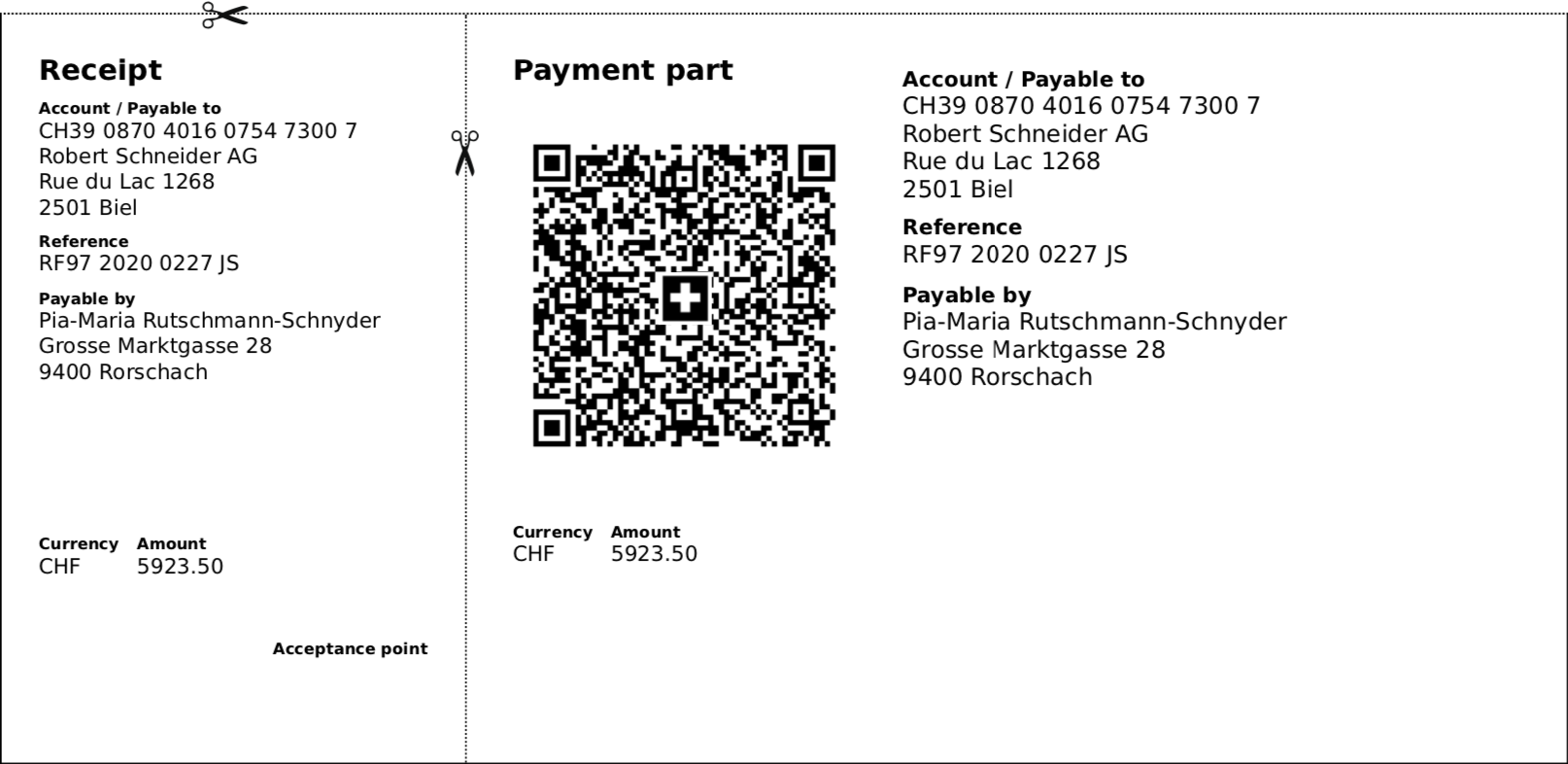
Swiss QR-bill example, produced with JustOn
The implementation adheres to the Swiss Implementation Guidelines QR-bill, version 2.4. The QR code data is checked against the QR-bill validator.
Note
The Swiss QR code implementation differs from the general SEPA credit transfer QR code approach.
Currencies, Accounts and References
The QR-bill supports invoices in CHF and EUR only. Which account and which payment reference JustOn puts into the QR code depends on the invoice currency and on whether the business entity specifies a QR-IBAN:
| Business Entity | Invoice Currency | Account | Payment Reference |
|---|---|---|---|
| without QR-IBAN | CHF or EUR | IBAN | ISO 11649 creditor reference (SCOR), starting with RF |
| with QR-IBAN | CHF | QR-IBAN | QR reference (QRR), 27 digits |
| with QR-IBAN | EUR | IBAN | ISO 11649 creditor reference (SCOR), starting with RF |
Be aware of the following specifics:
-
JustOn creates the payment reference from the invoice number (
Invoice.Name) on invoice finalization, provided theAdd QR Codefield on the related template is set toSwiss QR Code(see Configuring QR Code Template). The reference is written to the Invoice fieldPayment Reference, overwriting any existing value.For the ISO 11649 standard reference (also referred to as structured remittance information), JustOn uses a hash algorithm if the invoice number contains more than 21 characters, creating a suitable, unique payment reference. For the QR reference, see QR-IBAN.
-
A finalized invoice keeps the type of its stored payment reference. When creating the PDF again, JustOn uses the account that matches the reference in the
Payment Referencefield. EUR invoices that were finalized with a QR reference before JustOn Billing & Invoice Management 2.124 therefore keep the QR-IBAN and the QR reference. This complies with version 2.3 of the Implementation Guidelines, which remains valid until November 2027. - If the
Payment Referenceof a finalized invoice is empty or does not hold a valid ISO 11649 reference, the QR code carries no payment reference. The stored text, if any, is printed under Additional information on the payment part. - Draft invoices do not have a payment reference yet. The starter templates mark the payment part of drafts as not to be used for payment.
QR-IBAN
As an alternative to regular IBANs with an ISO 11649 reference (SCOR), JustOn supports Swiss QR-IBANs with a QR reference (QRR) for invoices in CHF. A QR-IBAN uses a dedicated bank identification (IID) in the range 30000–31999. Unlike a regular IBAN, it makes the payment reference a mandatory field in the payer's e-banking, which enables fully automatic payment matching. For details, see QR-IID and QR-IBAN.
The QR-IBAN is specified on the business entity. For details, see Using QR-IBAN.
Be aware of the following specifics:
- The QR-IBAN applies to invoices in CHF only. For these invoices, JustOn generates a QR reference – a 27-digit numeric reference including a check digit – based on the invoice number on invoice finalization, instead of the ISO 11649 reference. As with the ISO 11649 reference, JustOn writes the value to the Invoice field
Payment Reference, and encodes it in the QR code together with the QR-IBAN. - Invoices in EUR use the regular IBAN and the ISO 11649 reference, even if the business entity specifies a QR-IBAN.
- If the
QR-IBANfield is empty, JustOn uses the regular IBAN and the ISO 11649 reference for all invoices. -
The regular
IBANfield remains required. TheQR-IBANis an additional, optional field.The
QR-IBANmust be a valid Swiss QR-IBAN (IID range 30000–31999). An invalid value produces an error when rendering the PDF of an invoice that uses the QR-IBAN. -
The QR reference is built from the digits of the invoice number only, letters are dropped. If a business entity uses several counters, these counters must therefore differ in their digits, not only in a prefix. The counter templates
RE[Year]{00000}andGS[Year]{00000}, for example, produce the same QR reference for the same year and count, so that payments cannot be told apart by their reference. - The counter must produce a number that contains digits other than zero. Make sure that the counter template includes the counter placeholder (like
{00000}), and that the start count is not negative. For details, see Counters and Number Ranges.
Note
- Do not remove the QR-IBAN from a business entity that has finalized CHF invoices with QR references. Otherwise, the QR code of these invoices combines the IBAN with a QR reference when creating the PDF again. This produces an invalid QR-bill without any error message.
- Do not edit the
Payment Referenceof a finalized Swiss QR invoice. The QR code uses the stored value as it is, and the value determines the account used in the QR code.
Info
A QR reference is grouped differently than an ISO 11649 reference, so JustOn provides a dedicated template field for each. The current Swiss QR starter templates print the matching one. An older or custom Liquid file that prints only the ISO 11649 reference shows no reference in the payment part text for CHF invoices with a QR reference, and for EUR invoices that were finalized with a QR reference before JustOn Billing & Invoice Management 2.124. The reference encoded in the QR code itself is correct in any case.
To update such a Liquid file, see Customizing Payment Part. Without a QR-IBAN, this update is not required.
Required Data
For the QR code invoice to work, JustOn requires the following data specified on the business entity and the invoice:
| Object | Required Field |
|---|---|
| Business Entity | IBAN QR-IBAN (optional, CHF only) Company Street Postal Code City Country Code |
| Invoice | Account Name Billing Street Billing Postal Code Billing City Billing Country Code |
The address information for both the business entity and the invoice recipient (billing address) must be complete. Blank fields for sender or recipient produce errors.
Be aware that the two country codes have different origins. Country Code on the business entity is maintained by hand, while Billing Country Code on the invoice is copied from the account and exists only if the Salesforce State and Country/Territory Picklists are enabled and configured. Without the picklists, the field stays empty without notice, and the QR code is not produced.
Note
Use a template with the Swiss QR code only for invoices in CHF or EUR. For invoices in other currencies, JustOn finalizes the invoice and stores an ISO 11649 reference, but does not create a PDF. The error message The currency <ISO code> is not supported for swiss qr codes (only CHF and EUR)! only shows when opening the invoice PDF. A PDF creation batch only logs the IDs of the unprocessed invoices.
This applies to credits and cancellations created with the same template, too.
Info
If your org integrates JustOn Cash Management and you use payment matching for automatic settlements, make sure to create a dedicated matching configuration that resolves the ISO 11649 payment reference (RF...). If your business entity uses a QR-IBAN, the matching configuration must cover both the QR reference of CHF invoices and the ISO 11649 reference of EUR invoices.
Limitations
- JustOn does currently not support the QR-bill fields
Billing informationandAlternative procedures. - With
PDF Rendererv1orv2, the QR code image is a raster image (PNG) that includes a quiet zone. The QR code itself then measures about 40–43 mm within the 46 mm box. - In the QR code data, characters outside the supported character set are replaced with a dot (
.). The printed payment part shows the characters as entered. - The QR-bill validator does not yet check the rule that restricts QR-IBAN and QR reference to CHF.
- The error message for unsupported currencies is available in English only.