Configuring ZUGFeRD E-Invoices
To support enterprise and public e-invoicing, JustOn Billing & Invoice Management can prepare electronic invoices.
Be aware that there are various e-invoice formats, distribution channels, and operators. As of v2.119, JustOn Billing & Invoice Management can produce electronic invoices in the ZUGFeRD/Factur-X format.
ZUGFeRD concepts
ZUGFeRD is a hybrid electronic invoice format: a regular PDF that a human can read, with the same invoice data embedded inside as structured XML.
JustOn Billing & Invoice Management generates ZUGFeRD 2.x/Factur-X aligned with the EN 16931 semantic model (ZUGFeRD catalog 3.0.1). It first renders the PDF/A-3 document (using the JustOn PDF service v3), then embeds the CII XML to form the final ZUGFeRD file. The content version type of the produced ZUGFeRD file is E-Invoice.
A ZUGFeRD file is a single PDF/A-3 document that contains:
- the visual invoice (rendered from a Liquid template),
- an embedded XML file (factur-x.xml) carrying the structured invoice data in UN/CEFACT Cross-Industry-Invoice (CII) syntax,
- metadata declaring conformance level, version, and the embedded filename.
To correctly create ZUGFeRD files, the following conditions must be met:
- PDF renderer
v3 - v3 Liquid template
- E-invoice distribution channel
Email
Prerequisites
- Business entity
- To create ZUGFeRD files with JustOn Billing & Invoice Management, you must properly set up your business entity as described in Preparing Business Entity.
- Common e-invoice setup
- Before configuring ZUGFeRD e-invoices, make sure to complete the common e-invoice setup.
Preparing Template
The base PDF must be produced by the JustOn PDF service v3. Older renderers (v1/v2) do not produce a PDF/A-compatible base, where the XML cannot be embedded.
Preparing a template to use the JustOn PDF service v3 involves the following steps:
- Open the Templates tab.
-
Click New.
This opens the New Template dialog.
Make sure that the New Template dialog is enabled.
-
Specify a meaningful name and select the template language.
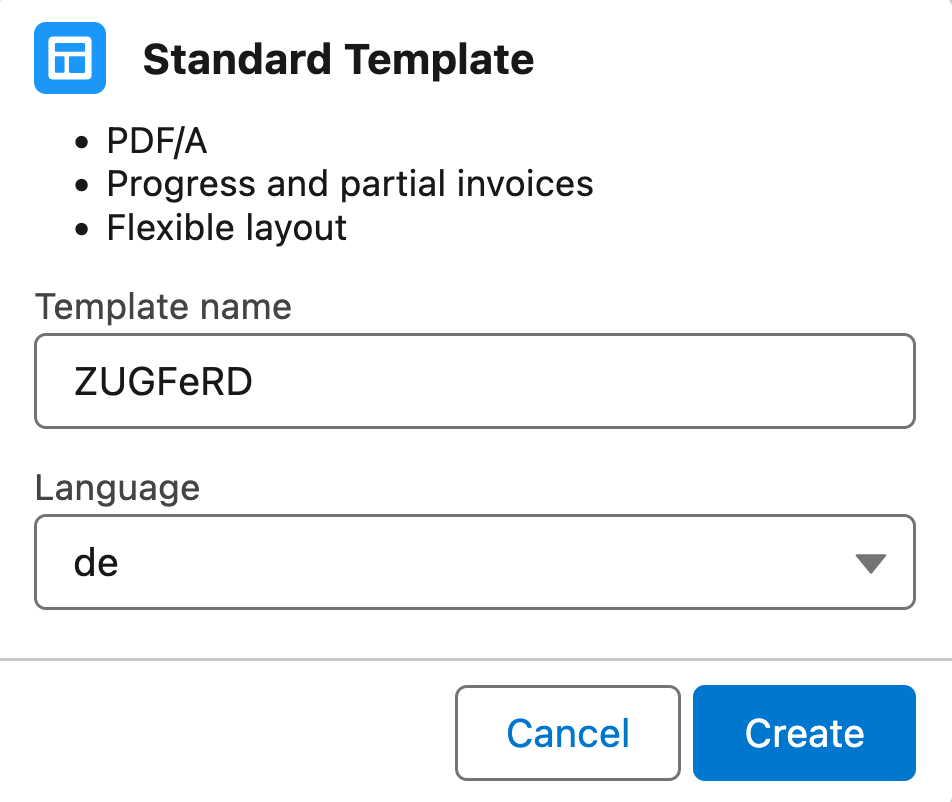
Creating a template for ZUGFeRD e-invoices -
Click Create.
This creates the new template record, which is immediately prepared to support ZUGFeRD e-invoices:
- The
PDF Rendererfield is set tov3. - The corresponding Liquid file is attached.
Language,PDF OptionsandOverride Labelscarry the values for the selected language.
- The
Info
Instead of creating a new template record, you can clone an existing template or directly use an existing template. If you do so, however, make sure to attach the required Liquid file and to select the PDF renderer option v3.
Enabling Invoices to Use ZUGFeRD
To produce ZUGFeRD or Factur-X e-invoices, invoices must must meet the following conditions:
| Invoice Field | Required Value | Notes |
|---|---|---|
| E-Invoice Format | ZUGFeRD |
|
| E-Invoice Distribution Channel | Email |
ZUGFeRD files can only be distributed by email. |
| Email File Types | E-Invoice |
Sets the ZUGFeRD file as a mandatory email attachment. |
| Template | ZUGFeRD template | The selected template must have attached the required Invoice Template Liquid file and specify the PDF renderer option v3 (see Preparing Template). |
The three fields must be populated correctly for the ZUGFeRD/Factur-X e-invoice generation and distribution to work. Invoices on which one of the values is missing or wrong will not produce ZUGFeRD/Factur-X e-invoices, or the distribution will fail.
The ON field mechanism is a likely option for having the e-invoice-specific fields set automatically when generating invoices. To make use of the ON field mechanism, you set the fields ON_EInvoiceDistributionChannel and ON_EInvoiceFormat on the invoice source object:
- Click to enter Setup, then navigate to the object management settings of the invoice source object.
- Click Fields & Relationships.
-
Create the following new fields.
API Name Data Type Required Value ON_EInvoiceDistributionChannel Formula(Text)
Text(255)
PicklistEmailON_EInvoiceFormat Formula(Text)
Text(255)
PicklistZUGFeRDON_EmailFileTypes Text(255)
Formula(Text)E-InvoiceON_Template Text(255)
Formula(Text)ZUGFeRD template name
(see Preparing Template)
For details, see Preparing E-Invoice Source Data and Email Attachments.